Showing posts with label Forever. Show all posts

Monday, November 5, 2018

Digital Memories Saved and Enjoyed Forever!

Happy November to you! It is a month of gratitude and thanksgiving, and Forever is always here for us to help us celebrate life's most precious moments. Whether you have calendars and cards to make for gifts using Forever Print, videos you want to share with other family members wherever they may be, or photos on your phone you want backed up safely and privately, Forever has you covered. 


November is a Great Month to Save!

Being the month of "Black Friday", Forever has amazing deals on all the things I love and use every day to keep my memories under control and in my life. If you love your photos and videos but are not a Forever storage member yet, I would encourage you to buy your permanent membership today. Flash drives and external hard drives are great for a while, but they are not permanent and they are easily misplaced or malfunction. Storing photos online as a second backup is a great idea and the "cloud" is a necessity in this digital age, but as photo printers like Wal*Mart and Flicker send out reminders that they are going to delete your photos if you don't order, and as the headlines point out daily about the privacy issues at Facebook and Google, I am so grateful for my Forever home for my photos, videos and documents. Forever Storage (all size accounts) is on sale for 30% off this month - it could be the greatest gift you ever get for you or your family:

 Here is a list of all the things on sale (and there are other deals that pop up from time to time so remember to check the "Deals" tab!) Let me know if you have any questions about any of them. 

November 1-30 PROMO CODE: BLACKFRIDAY18
·         Save 40% on all Printed Calendars! 
·         Save 40% on all Printed Projects!
·         Save 40% on FOREVER Artisan® purchases and upgrades! 
·         Save 40% on FOREVER Historian™ purchases! 
·         Save 30% on all FOREVER Storage® Single Payments or get your first month FREE!
·         Save 30% on all Digital Art!
·         Save 15% on all Conversion Boxes!

Conversion Services

If you have had scrapbooks, photos, negatives or videos converted by Forever, you know what a wonderful job they do. Now that Forever has video capability in your Forever account online, you can decide whether you want to have your videos you have had converted stored there in addition to the flash drive you were sent. If you have videos, there are two ways to store and enjoy them. For permanent account members, videos can be uploaded and stored for future download just like any photos you have up there without any additional charge. If you want the extra privilege of streaming and sharing, a Premium Video Plan lets you do that. I have it and I LOVE it! Here is a video I can enjoy and share anywhere because I have the video plan - what would YOU like to save? 

 November is a wonderful month to think about the memories that matters most to us and I am here for you! I hope to connect with you soon - please let me know how I can help you make your photo projects come to life. Fran


Wednesday, June 7, 2017

Summer Scrapbook Ideas You Can Use Now! June Blog Hop Stop Number One


Summer is a great time for taking pictures, and it is also a great time to do something special WITH those pictures! Everything slows down just a little bit in the summertime, and it is so wonderful here in the South to kick off the end of the school year with a family get together to commemorate Memorial Day. Where there is family, there is food, and where there is food there are often photos. That is exactly why I was so excited about the newest collection from Creative Memories appropriately titled Made with Love (oh yeah, and I do sort of have this obsession with gingham!) The collection features beautiful food themed papers, stickers and mats, and it is truly stunning for your scrapbook pages. 

The Creative Memories Made with Love Collection  is perfect for your delicious "foodie" pages

While there are even newer paper packs and sticker sets that just came out this week such as the limited edition Americana and Adventure collections, I was still very excited to work on some recipe pages using "Made with Love." You will see I was fortunate to have a little help from three very special women in my life. I hope I will inspire you to do the same with some of your summer food photos! 

Let's Start with A Very Special Wedding Gift 


When I was engaged to be married, my mother's sister gave me the greatest gift a girl could imagine. It was a collection of recipe cards in the handwriting of my beloved aunts, cousins and grandmothers, and it is irreplaceable. I have naturally scanned them all and stored them in my Forever account in an album called "Recipes" because these are documents I want to keep for generations. I treasure this gift so much and can almost imagine my Nana and my Italian aunts sitting at the table writing them out, and I can practically taste and smell the dishes as I am reading the cards.

Treasured family recipes collected for me by my aunt for a wedding present

My Nana's and my mother's handwriting in one place

Adding Pictures to the Recipe Card Concept

My Mom and my two aunts are such amazing cooks and I always love getting recipes from them, but this Memorial Day I asked a special favor of them. I knew they would be bringing delicious dishes to our get together so I asked them in advance if they would mind if I brought them some Made with Love mats to transcribe their recipes on while we were visiting. They of course said yes, so I brought my camera and made sure to get a picture of them writing down their recipes for me. Seeing who lovingly prepared the dish is just one more element that makes these memories and family treasures even more special. 

"Skinny" sweet potato fries prepared by my Aunt Sherry

An Irish Cream Cake prepared by my own Mom with the recipe written in her handwriting 

A delicious butter bean Greek salad with the recipe written in my Aunt Donna's handwriting (it was a long recipe so I will most likely be using a 4X6 sleeve to include the third card!)

I am so happy with the way this two page spread turned out!
So the next time you are getting together with family or friends, bring your camera and some slide in cards and ask if them if they wouldn't mind taking just a moment to share their recipe with you in their own writing. Do take a picture of the dish as well as the cook!  Preserving memories can happen anywhere at any time ,and they will surely be flattered that you thought of them and want to celebrating their cooking. Can you think of any other way to document family recipes? I'd love to hear from you in the comments below! 

For more ideas on ways you can create scrapbook pages this summer, please enjoy the rest of the "Blog Hop!"

• Stop 1 with Fran Allen Smitherman CelebratingYourBeautifulLife YOU ARE HERE!
• Stop 2  with Sarah Fitzgerald ClickWriteShare

• Stop 3 with Noreen Smith OrganizedandCreativeMom
• Stop 4 with Karyn McDermaid-Rolfe Karyn Crops
• Stop 5 with Lisa Brown Graham Lisa's Workshop
• Stop 6 with Julie Tambrini Julie's CM Blog
• Stop 7 with Stefani Jones CropwithStef


This blog contains affiliate links for which I may be compensated should you make a purchase. Thank you as always for your support of Celebrating Your Beautiful Life and I am always happy to help in any way with your traditional or digital photo preservation projects. 

Wednesday, April 5, 2017

Spring Blog Hop - Stop Number 2

Spring Break Memories!

Ahh, Spring Break - that magical time so needed by students everywhere as they attempt to make it through the long stretch between the Christmas holidays and summertime! Whether you have a sanctioned "spring break" or not, I hope you have chosen to do SOMETHING special to celebrate the change in the seasons. Our blog hop today is focusing on all things spring, and while chronologically I am nowhere near caught up with my photos and should not even be THINKING about these pictures yet, I'm cheating (and giving you permission to do the same!) I always tell those who are overwhelmed with the volume of photos and projects they are "behind on" to start with something current, so I am following my own advice.  I am definitely "guilty" of scrapping what I am in the mood for, and many times vacation photos take priority because they are just so darn fun (right?) 

Once the day is done, there's really nothing like loading your pictures onto your computer and looking at a full screen version of your memories. I encourage you to set aside some time to take a seat at your laptop with a beverage of choice and start the process of recording YOUR Spring Break  memories. Once you have completed and printed your digital book, the entire family will be able to easily enjoy and relive the trip over and over again - memories preserved for a lifetime are the reason we take these pictures in the first place. I've already started my Spring Break 2017 book and I can't wait to share a few pages from our recent trip to Orlando with you here! 


Grab some coffee and your laptop loaded with Artisan 5 digital scrapbooking software so you can start your own digital photo book while the memories are still fresh!
Photo credits: Yamilette Platero at The Boss Latina


Our Spring Break was last week, and this year we took my parents with us down to Orlando to have some fun at Universal Studios, Islands of Adventure and the Kennedy Space Center. As you can guess, I took LOTS of pictures - I mean it's not every week you get to meet Marilyn Monroe, Lucy and Sponge Bob AND watch a SpaceX rocket take off!


My little guy turned down a kiss on the cheek from Marilyn Monroe - at least he said "no thank you!" She sure was a good listener to all of his concerns about the day :) 

A SpaceX rocket launching with a great view from the Kennedy Space Center

I am determined to get these stories told and photos shared so the family can relive the memories through the pages of my photo albums. With over 1,500 pictures and lots of stories to tell, I want this project done quickly while the memories are fresh, so as I do with so many trips, I am choosing to make a digital scrapbook in Artisan and have it printed as a hardbound 12X12 book at the Forever Print Shop

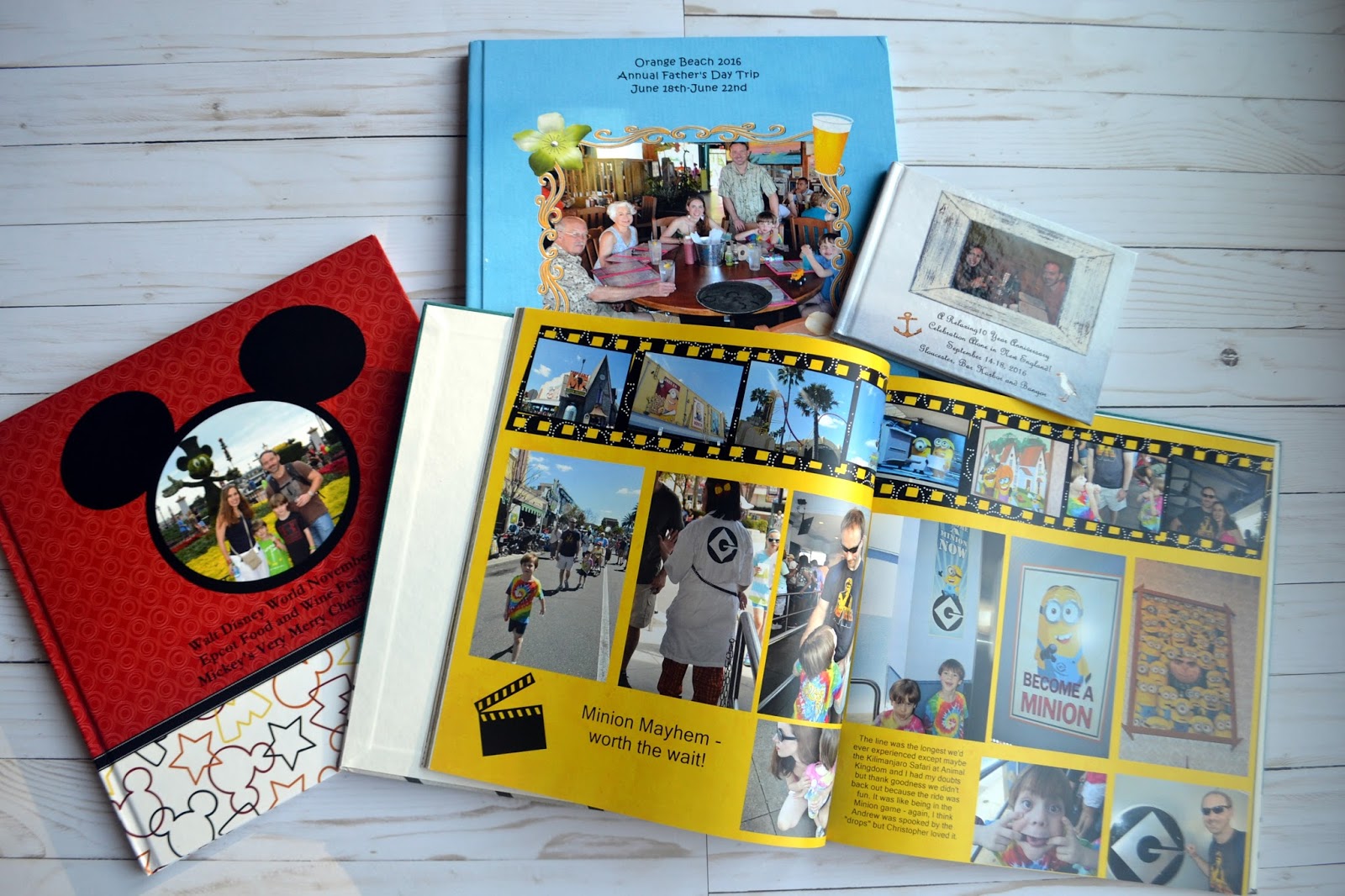
A few of my digital vacation books from the past few years - so easy to travel with and the whole family loves looking through them!

You might remember how excited I was during our Christmas Blog Hop when I found out that Creative Memories was introducing digital art to match their fabulous paper and stickers, and I am happy to show off a few pages here using some of those kits. Due to a few "down days" where we were able to relax away from the parks, I was actually able to carve out some time while on vacation to start on my book. I am already having so much fun with my digital photos and thanks to my Artisan software program and some super fun Creative Memories digital art kits my pages are really popping! I don't claim to have the most elaborate pages because I am more interested in getting my books done and the stories told, but it is nice to have a pop of color and some fancy fonts here and there. Let me show you what  I mean.

Beleaf It or Not! 


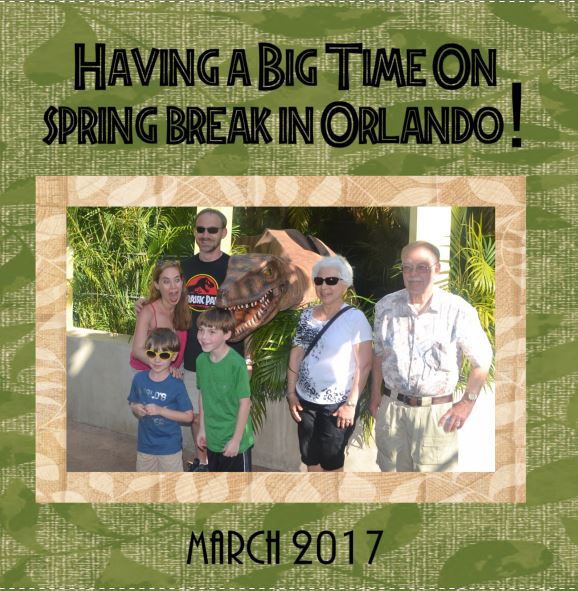
I have never been one who worried about having an exact paper or sticker to match my theme. Licensing gets tricky and I always like to think outside of the box when I scrap anyway. So when I didn't have a Jurassic Park kit to scrapbook this hilarious "raptor encounter" moment, did I sweat it? Not a bit! I just reached for my Creative Memories Better Beleaf It digital scrapbooking paper and a free Jurassic Park font from Dafont.com and went to town. I liked it so much that I decided to make this moment the front of my book. I loved how the leaf paper wrapped around the back of the book for me to add more photos to it for a consistent design. What a great feeling knowing my entire cover is finished already!

The front of my Spring Break digital 12X12 book. This Jurassic moment brought to you by a free font and Creative Memories' leafy "You Better Beleaf It" digital paper pack! 


The back of my 12X12 book captures a fun moment for each of us, with a "thankful" phrase from Creative Memories' Painted Harvest Digital Mat Pack

The front and back of my cover as seen in my Artisan software (CM digital artwork displayed in the Content panel on the right.)
Cool and Serene! 

One of the prettiest collections Creative Memories has introduced in recent times has been the Cool Serenity collection! I love it traditionally (there is paper, a Fast2Fabulous album and embellishments) but I REALLY love it digitally because I can stretch and shrink the elements to my liking! Again, I didn't have a Moana scrapbooking kit, but boy I love how this Cool Serenity digital art kit worked so perfectly on my pages to create this tropical feeling. I foresee a lot more use out of it for trips to the beach and aquariums in my future. "You're welcome!" (uhh, inside joke - you must see the movie!)

Who needs a "Moana" kit when you have Creative Memories' Cool Serenity papers and embellishments?

Did Someone Say DONUTS? 

Okay, I am a sucker for images of food, and I just loved these pictures of my son with a donut that was literally bigger than his head. Hey, he deserved it - we had just ridden the Twilight Zone Tower of Terror*, haha (note - these pictures are actually from a trip we took back in February. Yes, I have a "Disney" problem, I can't seem to stay away and I have several books going right now!) If you love images of sweets like I do, then the Soiree collection has you covered, with cupcakes and donuts and everything you would need for fun celebratory cards and scrapbook pages! As much as I love the Soiree collection on paper, for this blog I am showcasing the fun of it digitally (and yes the word "fun" is one of the embellishments that comes with it.) 

*For another idea for your Tower of Terror pictures, check out my post in our February Blog Hop
A little fun with the digital Soiree art kit from Creative Memories

More fun with Soiree digital paper and embellishments! 

While this particular blog post is primarily about digital pages, I am definitely an "ambiscrapper" who loves traditional and digital scrapbooking, so I have also had fun with the paper versions of this kit. The cool thing for my readers is that you can get the Soiree sticker set  (an $8 value) for FREE throughout the entire month of April if you set up a new account at Creative Memories and place an order for traditional product. Get it now while it lasts - CM has been great about introducing new products but that often means "out with the old, in with the new!"  

Free stickers in April for new orders at Creative Memories!  

Have you had a chance to use Creative Memories' digital artwork yet? If so, we would love to see what you have done - feel free to share your work on the Creative Life Scrapbooking team's Facebook page! And what vacation scrapbook would you like to work on this week? I'd love to hear from you in the comments below. Please do enjoy the rest of the "hop" and until next time, keep scrappin' :)  

Next stop - Organized and Creative Mom with Noreen, enjoy! Fran

Here is a list of today's participants: 

Stop 1 Stefani Jones Crop with Stef
YOU ARE HERE! Stop 2 Fran Allen Smitherman CelebratingYourBeautifulLife
Stop 3 Noreen Smith Organized and Creative Mom
Stop 4 Candace Bouldin ScrapinJPEGs
Stop 5 Karyn McDermaid-Rolfe Karyn Crops
Stop 6 Lisa Brown Graham Lisa's Workshop
Stop 7 Diana Miller Brinsley D Brinsley's Blog


Wednesday, December 7, 2016

Christmas Blog Hop!

Welcome to Celebrating your Beautiful Life! I hope you have enjoyed the wonderful ideas in the blog hop so far, and if you are starting here be sure to check out all of the other blogs for some great inspiration - the links are at the end of my post.

It is that time of year when our minds turn to memories of the past and excitement about the days to come. Scrapbooking is near and dear to my heart as I love to record the details of life so as never to  forget them, and it is something that I do not just during special times such as the holidays, but all year long. While I love my shelves and shelves of Creative Memories 12X12 and 8X8 traditional scrapbooks, I am also in love with the many albums and projects I have created digitally. Needless to say, I was VERY excited to find out that Creative Memories was planning to introduce digital artwork for digital scrapbookers!

Creative Memories has announced that it will soon be offering digital images of its artwork! 

For years people have admired CM for its beautiful watercolor paper and stickers, so it will be exciting for their fans to see what they offer when they step back into the world of digital scrapbooking. It is especially exciting for so many of us who are still using our beloved Artisan 5 software (formerly sold by Creative Memories as Storybook Creator Plus but now supported by Forever!) CM has not announced a formal date yet but we do know the artwork will be in a universal format that will work with most scrapbooking software programs.

While we wait with anticipation, let's talk about digital scrapbooking a bit. This time of year is perfect for taking beautiful photographs and it is also a good time of year to give gifts, and there are many different types of projects you can make using digital artwork. Whether it is a gift for yourself or a gift for someone else, printed projects created digitally are sure to be as cherished as traditional ones, and a little bit of artwork goes a long way in making your creations just a touch more special. Since we can only imagine what types of digital papers and embellishments we have to look forward to, I would like to share a few images of projects I have made using digital art kits within Artisan 5:

Page Prints

One of my favorite ways to use digital art kits is to employ predesigned pages (similar to Creative Memories' Fast2Fabulous line!) Predesigned pages make it easy to quickly create a lovely book or page print with many photos, thus making the most of the space (and limited time) you have. The hard work has already been done for you! The pages shown here are actually the inside of a bound digital book I made with Artisan and Forever's digital artwork, but they could also be ordered as page prints and slid into a high quality Creative Memories album (I mix the two up all of the time!) I also have a canvas of the first one!


A predesigned tree using Forever's digital artwork

A predesigned page made this wreath a breeze to pull together


Hardbound and Softbound Books

It is always so exciting to watch your stories come to life quickly through the power of digital scrapbooking. One of my favorite recent projects was a hardbound Christmas 2014 album - I had it in my hands before the month of January was over! I love the speed and ease of digital album creation - I think I am even more creative digitally than I am in my traditional albums because it is easier to play around with your artwork.


A few of my digital 12X12 hardbound books
Watching the pages come to life in Artisan 5

A project view in Artisan 5


A completed two page spread in my 12X12 digital book


Canvases and Facebook Banners

I am giving canvases as Christmas presents this year - I love how these are high quality yet lightweght and easy to hang on any wall. I used Creative Memories' original "Expressions of Love" vellum verses for my wedding banner, and I used Creative Memories' Dance Additions digital artwork from several years ago to create the banner of our recent performance of "The Lion, the Witch and the Wardobe." I can't wait to see how CM's newest designs turn out when they release their digital artwork!

Love my wall art!

FB banner turned into a canvas - what a wonderful gift

A Facebook banner created using the former Creative Memories' Dance Additions digital artwork

Invitations and Christmas Cards


Digital scrapbooking software can be used for a number of things, including invitiations, business cards, letters to Santa and of course Christmas cards! I have even used Artisan to create business cards and gift tags (available for print at the Forever Print Shop.) 


Front of a folded 5X7 card 

Inside of a folded 5X7 card - a project choice within Artisan 5 that can be printed at the Forever Print Shop


As you can see, digital scrapbooking software can open up the doors to many different types of projects, and we are all very excited to have Forever's support of the software we love (Artisan 5) as well as the prospect of Creative Memories offering digital artwork in the future. I have always combined the traditional and digital worlds happily, and this move by Creative Memories is welcomed by many. We will be watching closely for a formal announcement! 

I would love to hear what you think of my projects and CM's announcement so if you would please leave a comment at the end I would be happy to send you a free ebook on photo safety! Be sure to check out the rest of the blogs so you can keep the Christmas spirit going strong - the next stop is Noreen Smith's Organized and Creative Mom!   Thank you for hopping over here, and keep on scrappin'! Fran

Stop 1 KarynCrops
Stop 2 Lisa'sWorkshop
Stop 3 DBrinsley'sMemoryKeepingBlog
Stop 4 CropwithStef
Stop 5 CelebratingYourBeautifulLife YOU ARE HERE!
Stop 6 OrganizedandCreativeMom

Sunday, April 17, 2016

What keeps you up at night?

What keeps you up at night? Are your memories as safe and organized as you would like them to be?

I have 90 Creative Memories scrapbooks and 97,000 digital photos on my computer. So yes, I basically panic every time I even THINK ABOUT anything happening to my house or computer. This has been a huge fear of mine for a while - all those memories are PRICELESS and IRREPLACEABLE. Enter Forever.

Forever is your one stop shop for your photos and the company's premiere offering is online storage for your photos. Unlike so many other providers out there, your memories are backed by the Forever Guarantee Fund and three servers strategically located throughout the U.S. Your account is fully encrypted like a bank's system and completely private other than the folks you decide to share it with. Your memories are guaranteed to be safe for your life plus 100 years - they will never shrink your resolution or share your info with advertisers. It is truly like photo insurance.

 The deeper I get into Forever, the more I love what I have been able to do to have fun with my pictures and to get that precious peace of mind I have been seeking for years! I want to share some images with you of what my accounts and projects look like:


My Home page where I can see all of my albums
What pictures look like as they come in from your phone or your PC (you can later drag them to your albums to get them out of this view!) The phone App is great - I have mine set to "auto upload" whenever I am on wifi. 

The inside of one of my albums, "Baby Andrew" - these are obviously pictures I would never want to lose to a hard drive crash of a photo vendor's tricky terms.

Whether you have a PC or a Mac, you can access your Forever account online, edit, organize and even create projects in Forever Projects (like "Artisan Lite".) I have created Storybooks and canvases already - I am about to try some cards because they are on sale this month.You can upload pictures from your phone and PC either automatically or manually (I love the phone app - it's free for your Smartphone or iPad!)

Forever also scans all types of media (photos, scrapbooks, videos, slides and negatives) and stores those high resolution images in your account. 
Forever Services has now scanned 7 of my traditional scrapbooks - I love seeing the images pop into my account. I can have them turned into page prints, into storybooks, share them with the people who are in the pages, or just sleep better knowing that if my house burned down all those pictures and  JOURNALING would be saved! Some things are irreplaceable- my 90 scrapbooks definitely fall into that category.

Personalized service - they call to let you know your digitization boxes have arrived safely before they start to scan them

Another album, home safe and scanned into my Forever account

In addition to curating my Forever account online, I also use desktop based Historian (formerly Memory Manager) and Artisan (formerly Storybook Creator) for more detailed editing and project creation. I love how I can create projects and work with my photos without the internet in these programs if necessary (some hotel rooms and scrapbook retreat venues don't always have the best wifi!) 
Want to create digital storybooks and have them preserved in the cloud (and printed as many times as you'd like!?) Here is how my pages are coming along in Artisan

A different view of a project coming together in Artisan

Now I can order my books any time I want!

If you haven't already, check out Forever - you will not be sorry! Please respond in the comments with any questions you might have - I am here to answer them! Here's to sleeping better at night! Fran


Monday, December 21, 2015

Take control of your photo chaos with Forever!

My Forever team recently held a Facebook event with our friends and family to show off all that Forever has to offer. It was eye opening for so many attendees and while I don't have the space to include all of the comments from the event,  I have included the transcript of the posts here for you. Note - A few missing posts were actually pop quizzes for prizes so excuse a few "missing" paragraphs.

There is a great 20% off sale going on until the end of the year (Merry20 is the code!) so now is the perfect time to look into a permanent storage account, Artisan, Historian and digital artwork (or to become an Ambassador yourself - the kits are on sale too!!) Click on the Forever banner to the right to go to my Forever page. 

Take control of your photo chaos with Forever! 

We are so excited you are joining us Sunday to learn more about controlling your photo chaos! School may be out, but everyone likes extra credit - here's your chance to move to the top of the class! If you set up a free account with Forever and install the App on your Smartphone we will send you a free ebook detailing the ways your photos are in danger. Just post a picture of your Forever home page and we will send you your 34-page ebook!
Forever Intro Video

DESCRIPTION
Got photos? LOTS of them? Everywhere? Smartphones, harddrives, laptops, external harddrvies, flashdrives, online retailers, facebook...the list is ENDLESS.
Wouldn't it be great to have them all stored permanently in ONE place and not have to worry about them? 
Wouldn't it be great to have them accessible to you, families and friends when needed to create fabulous photo projects including storybooks?

POST 1 - INTRO
Everyone takes pictures - smartphones, snap n shoot cameras and expensive cameras. What do you do with them? how many times have you looked through your smartphone and awwed over pictures you took a few months - years ago? how would you feel if your phone dropped in the water or was stolen without getting a chance to back it up? what about your computer? how many have you had in the past 10 years? were you able to recover your photos from all the computers you've had? wouldn't it be nice to have all the special photos somewhere you could feel safe about and have access to while on the go with an app? Are you ready to learn about something that will help with all of the above???
POST 2 - FOREVER...
Forever was founded by Glen Meakem who previously founded the highly successful business-to-business ecommerce company, FreeMarkets, Inc.
The Forever mission
Glen founded Forever because he believes peoples’ critical family memories are at risk. He believes that by combining modern digital technology, including cloud storage, with modern financial tools like a permanent guarantee fund (similar to an endowment) and highly ethical business practices, that he and our team have created a better way for people and families to preserve and share their most important traditions, values, and memories.
POST 3A: When people printed photos we ended up going through boxes of them when a love one dies. Now, we don’t even know where their photos are! Some are on various printing services, some on hard drives, some on phones and some already lost due to hardware failures.
Now, we’re going to look at the online storage we use and some of the weaknesses. It is not bad to use any of these services, it is just important to understand where they might fail you and why you need Forever Guaranteed Storage.
POST 3B: Are your photos safe long term where you are storing them? Have you ever read the terms and conditions? Here are a few weaknesses of a few that I looked at. Many of them have almost identical terms.

POST 3C: Did you know many services will delete your information if you don't buy something every year? You may say you order a lot now, but what if you were diagnosed with cancer and were going through treatment.. would you order every year? Could your family still get the photos the next year?

POST 3D: When you put your photos on free services you are sacrificing your privacy!

POST 3E: Walmart lowers your resolution of stored photos after 90 days. YIKES!

POST 3F: Where are your photos when you pass away? First, does your family know where to find them? Second, did they get deleted because you died?

POST 3F: Forever is the solution to long term storage. Your life time plus 100 years GUARANTEED!

POST 3G: With Forever, you don't have those concerns! Guaranteed storage. No data mining, photos in one place and passed on from generation to generation...EVEN file types are preserved and converted over time!

Post 4: FOREVER is the world’s first, on-line,permanent storage and sharing company. It gives us the opportunity to honor,protect, and share our family’s memories and pass them down for generations. Forever is the only company to offer permanent storage and Forever has a patent pending on this product. Many of the companies that offer storage will tell you in their privacy statements NOT TO RELY on them as a cloud storage. If it is a free account, they can delete your content at their discretion. If it is a paid account, they will delete once you stop paying for their services, Forever won’t. You content will always be there and Forever will never go in and delete your content.

Post 4A: Forever is tripled backed up in three different locations throughout the US. So if one location is down, you still have access to your content.

Post 4B: With Forever, you will maintain ownership of your content in your storage account, you control who can see your content, and you can trust that your data will not be mined nor sold to an outside company. Your Forever account is fully encrypted so that your documents and photos will be safe.

Post 4C: Forever can be used with Apple Products and Windows based products with Apps for the iPhone, iPad, Android, iOS and Windows operating systems

Post 4D: With Valet, you can set your photos that you store on your computer to upload straight to your Forever account. Valet will be discussed in a separate post.


Post 4E: Glen Meakem is the founder and CEO of FOREVER. Glen has been extremely successful as an entrepreneur and venture capitalist. Glen started FOREVER, Inc. in May 2012.Glen was watching his father getting older and one day, received a box of his memories, photos and awards. All of the items that were the most precious to him. His first thought was to go put these items in a safe and make sure nothing happens to them. But, on the other hand, he really wanted his family to see them and enjoy them, however his family is scattered all across the country. That was when the wheel in his brain started turning and he started to create the idea of PERMANENT storage. He thought, “What can I do to make these items not only permanent, but shareable?” That is where the idea and the roots of FOREVER come from.

Post 4F: Forever is not only about permanent storage, these services will be discussed in detail in another post. Forever also offers conversion services; converting those precious memories into digital format and then placing them in our account. We also offer digital software to create beautiful scrapbooks and pages and to organize your digital photos. And we offer beautiful digital art that can be used within the software to create those beautiful albums.

POST 5: Have you seent this on your phone or iPad? You will never see this notice on your phone when you have the Forever App!
The Forever App gives you the freedom to automatically backup all your photos in one safe home - your Forever storage cloud. The App lets you organize your photos on the go, arrange them by timeline, and easily share them.

POST 5A: the Forever App is so simple to use! Click the camera icon to open your camera and have the photo automatically uploaded to your Forever account; click the Photos icon to add photos...

POST 6 - Make it online with Forever Projects.
Making simple print projects on the web is a snap with Forever. With our easy online tool you can make a project in no time and enjoy high quality prints of your memories.

Post 7
Artisan 4 is for 32 bit computers and Artisan 5 is for 64 bit computers

post 7b

Post 7c

Post 7d

post 7e

Post 7F

POST 8: Digital Kits. Forever sells digital kits for use in Artisan. Easy to download, easy to install. Every topic I wanted while designing my Christmas Calendars, I found in the digital kits.

POST 9 All this talk of storybooks makes me want to talk about Storybooks! They are the perfect way to document a special holiday, a memorable vacation, a baby's first year, a wedding, a sports team's year or just about anything that you want to document quickly and without a mess! All you need is your computer, your photos and either Artisan or Forever Projects.
Benefits – No mess, just you and your laptop! Can easily order multiples of the same book! You can use your “paper” and “stickers” over and over again, you own your content!


Post 9 video smile emoticon
POST 10: Historian is a desktop, photo management software program (doesn't require internet to use it!) that allows you to share, organize, and edit your digital images & videos. It is incredibly easy to use!
What if I told you that you can have all your photos on your computer automatically sorted by date? This is probably my favorite feature of Historian! 

POST 10A: With Historian, you can sort and organize your photos the way you want to! You can create folders and tags to help you sort your photos. You can even journal and tell a story about a photo without fear of having a limited number of characters (this is also one of my favorite features!). Imagine being able to remember the details of silly picture from a few years ago because you typed the story in Historian...

POST 10B: If you're like me, your pictures sometimes (okay, usually) need a little TLC. Editing can be as quick and easy or as fancy as you'd like it to be. Historian can walk you through the 7 most common editing needs or you can go rogue and do the ones you want. Look at a few of my favorite editing features (click on each picture so you can read about the feature used)...


POST 10D: Historian is also great for sharing pictures, videos, and slide shows. You can share via email, post on social media, and easily upload to your Forever account. 
Album organization is also a fun feature of Historian! You can select the type of traditional pages that you want to use and use the Album feature in Historian to organize your layouts.

POST 11 - Everything in one place
Forever Valet makes it easy to upload all your photos and albums from your desktop into Forever.
Choose any folder on your desktop and Valet will upload those photos plus any new photos to your Forever Inbox
Upload photos, albums and metadata directly from iPhoto, Aperture and Picasa web.
* Picasa web currently only available for Windows
POST 14 A calendar is a wonderful way to enjoy some of your favorite memories throughout the year. Artisan created calendars comes in four different sizes. Two of the available wall calendars feature a full page layout on the top and a tear away grid section on the bottom. The page layout is 12x12 or 8x8.
There is also an 8.5 x 11 wall calendar and a 4 x 10 desk calendar option.
Forever offers quick calendar pages that you can just insert your favorite photos in. You can also use your own creativity to create your own unique pages. The Artisan program operates completely offline until you are ready to upload your project to Forever.com for printing.
Think it’s too late to do a calendar for 2016? You can start your calendar with any month of the year. Why not start one today and have it in time for Valentine’s day?

Post 15 - Forever Digitization Services. Any of you like me and live in mortal fear of fire, flood or tornadoes destroying your photo albums, photos or videos? I have been a scrapbooker for as long as I can remember and I have over 90 albums so I was relieved to discover that Forever offers digitization services for not only videos and photos but also of entire photo albums. The photos, the journaling, and the embellishments can all be preserved with their white glove service, and all size boxes include not only the price of the digitization service itself, but also the three-way shipping and insurance or your package.


POST 18: Remember all those special people and moments with a double sided ornament. Artisan lets you personalize an ornament for your tree to reflect your own style. There are five different styles available.
The ornament is printed on white aluminum which will make it last for years to come. This also opens it up to be used for many other purposes, like a gift tag or a luggage tag. This project can be completed in less than 10 minutes. Once completed you upload it to Forever.com to process it for printing.
Here are two of the styles available to make.
This video tutorial takes you through the steps for creating an ornament.https://blog.forever.com/5-creative-ideas-personalized-chr…/

POST 21 gift certificates available - purchase today for the extra incentive and use by 12/30 with MERRY20 code for extra savings
Gift certificates do NOT expire
Be sure to enter a FOREVER Ambassador at checkout

POST 22 MERRY20 coupon code for 20% discount at checkout

POST 23 - If you like what you heard today, and want to start a new business adventure in 2016... Ambassador opportunity. $149 kit is also on sale until 12/30 20% off!. help others keep their photos safe and earn commission on all your sales.
No minimums or quotas

Post 24A ForeverLive! Who wants to join us at the picture party of the year? It is not just for Ambassadors, it is for ANYONE who loves their photos! Watch this quick video to see what it's all about! Check out the party around 2:26 :)
smile emoticon

Post 24 B Pictures of Forever Live!
ForeverLive 2015 was a blast and I cannot wait until ForeverLive 2016! It was just announced that it will be held in Nashville, TN in September. The earlier you buy your tickets the more you save was so let one of us know if you want to get in on the fun for less money. The inaugural event was so much fun - great food, tons of cropping time, education on photography and digital photo preservation, and a gala dinner with dancing the last night! This is a great opportunity for scrapbookers, photo organizers, photo enthusiasts and anyone interested in capturing their memories and telling stories!
All experience levels are welcome - there will be many sessions to choose from (not to mention hours of dedicated traditional or digital cropping time - whoot!) There is a welcome reception on Thursday night, snacks, lunch, speakers and crop time on Friday and Saturday, a gala dinner on Saturday night, and a crop on Sunday that lasts until noon (no rush to check out.)
Speakers and goody bags (worth over $300 last year) to be announced. In 2015 we heard from Glen Meakem, Founder and CEO of Forever, Inc, Tory Johnson, best-selling author of The Shift, Mike Carroll and Paul Schweiser, the developers of our beloved Artisan (Storybook Creator) and Historian (Memory Manager) software programs, the Pixies of Pixels2Pages, and Nick Kelsh (renowned photographer and author of 9 books) and more.


Post Event Homework
Once you've had a chance to digest the information shared this evening...contact the FOREVER Ambassador who invited you if you have additional questions (or you can post here) and definitely reach out to her before purchasing...
But if nothing else, please BACKUP your photos in the next 24 hours...We hope you never need it, but it's sure nice to have when you do.
I invite each of you to create an Intro account at www.forever.com by 12/22 & let your Ambassador know you've created it. It's FREE and allows you to store up to 3gb of photos. Special gift for you when you do!

I hope this helps! Reach out to me if you are interested in any of this and have a very Merry Christmas! Take lots of pictures and keep scrappin'! Fran